

If your week feels like a thousand tiny interruptions, you don’t need better willpower. You need a better system. Delegating tasks is that system the only system that reliably buys you back time without slowing the business down.
Founders usually delay because they think delegating tasks will create more work: explaining, correcting, and checking. That happens when you hand off random tasks without a structure. Done right, delegating tasks reduces the noise that keeps you from sales, product, hiring, and strategy.
Use it as your first 30-day task transfer plan, starting this week, right away.
What does it mean to delegate a task?
To delegate a task means transferring ownership of an outcome to someone else, along with the context and boundaries they need to finish it without constant approval. Delegating tasks means not “do this for me.” It’s “own this lane, report back like an operator.”
If you’ve ever said, “I already tried delegating tasks, and it didn’t work,” the real issue is usually one of these:
- The outcome wasn’t clear,
- The inputs were missing,
- The authority wasn’t granted,
- The review rhythm wasn’t defined.
Why is delegating tasks hard?
Because founders are “high-context.” You know what matters, who matters, and which details are landmines. Your remote assistant doesn’t yet!

The mistake is expecting mind-reading. The fix is packaging. Delegating tasks becomes easy when every task comes with the same transfer packet: outcome, inputs, steps, boundaries, and QA.
There’s also a psychology piece: leaders often hold work because of control, perfectionism, or fear of rework. DDI’s leadership assessments have found that only about 19% of leaders show strong delegation ability, so the struggle is more common than most founders admit. The fastest way around it is to start with low-risk tasks and a tight feedback loop.
What should you delegate first?
The best first tasks are boring and repeatable. Start with work that is:
- frequent (daily/weekly),
- rules-based (documentable),
- recoverable (low blast radius),
- high-friction for you.
That’s how to delegate tasks effectively without putting the business at risk. You’re building a repeatable lane, not dumping a to-do list.
How do you delegate tasks without losing quality?
Use this five-part “Transfer Packet” every time you outsource tasks to virtual assistants:
- Outcome: one sentence — “Done means…”
- Inputs: links, logins (via password manager), examples
- Steps: a short SOP or bullet process
- Boundaries: do/don’t rules (tone, timing, permissions)
- QA: What will you check and how often
That’s the best way to delegate tasks because it removes ambiguity. Your remote assistant learns faster, and you stop getting “quick questions” all day.
What do virtual assistants do?
What do virtual assistants do well? They run repeatable lanes: scheduling, coordination, research, customer routing, admin task processing, and follow-through. Virtual assistant duties vary by skill level:
- A virtual administrative assistant is excellent for virtual assistant administrative tasks: inbox sorting, documents, data entry, and scheduling.
- A remote executive assistant can handle executive assistant responsibilities: stakeholder coordination, meeting prep, follow-ups, and calm decision routing.
- A general remote assistant often spans both, depending on training and SOPs.
If you’re using virtual assistant services, your job is to match the lane to the right skill level, then build one clear virtual assistant task list, a useful habit as the VA services market is projected to grow from about $19.5B in 2025 to ~$32.9B by 2030.
The First-30-Day Delegating Tasks Plan
Here’s the reality: delegating tasks works best when you start narrow, then expand. Use this week-by-week plan, and you’ll feel relief fast without losing control.
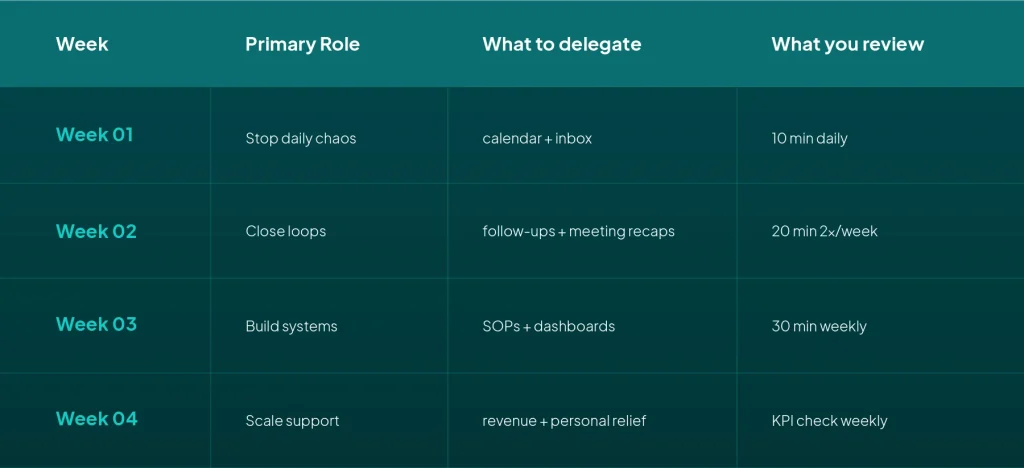
At Anywhere Talent, we see founders win fastest when they choose one lane (calendar, inbox, or follow-through) and let the assistant own it end-to-end for two weeks before adding more.
The Task Transfer Checklist Template
Paste this task checklist template into Notion/Drive and reuse it for every handoff:
- Outcome: “Done means…”
- Owner: one person
- Deadline: specific date/time
- SOP link: steps or screenshot
- Inputs: files, access, examples
- Boundary rules: do/don’t
- Escalation: what comes back to you
- Update cadence: when they report
- QA: how you check quality
If you do nothing else, do this. Delegating tasks becomes repeatable when your transfer packet is consistent.
The 25 High-ROI Tasks (with “Definition of Done”)
Below are 25 high-ROI items for your virtual assistant task list. Each one includes a simple definition of done, so delegating tasks doesn’t turn into back-and-forth.
A) Calendar + Scheduling (fastest relief)
1) Meeting scheduling
- Done means: meeting booked, time zone checked, invite includes location + agenda ask.
2) Confirmations
- Done means: confirmation sent 24 hours before, attendees know the goal and what to bring.
3) Reschedule handling
- Done means: three new options proposed, buffers protected, no double-booking.
- Done means: titles are clear, links attached, duplicates removed, priority blocks protected.
5) Travel light planning
- Done means: options presented with cost/time trade-offs, itinerary stored in one place.
B) Inbox & Communication Triage
- Done means: all new emails sorted into Decide/Delegate/Draft/Schedule/Later.
7) Draft responses
- Done means: drafts written in your tone, only escalations sent to you.
8) Follow-up drafts
- Done means: follow-up sent on a cadence (24–48h then 3–5 days) until closed.
9) “Questions Log.”
- Done means: all questions go in one doc; you review once per day in Week 1.
10) Daily brief
- Done means: one short message before your first meeting (priorities, risks, decisions).
C) Meeting Prep & Follow-Through
11) Agenda requests
- Done means: agenda requested 24 hours prior; meeting goal clarified.
12) Prep packs
- Done means: context links, prior notes, a decision needed, and a one-line objective.
13) Recap emails
- Done means: decisions + action items sent within 2 hours, owners and deadlines included.
14) Action tracker
- Done means: action items logged in one place; weekly nudge sent to owners.
15) Stakeholder updates
- Done means: key stakeholders receive updates on cadence without you chasing.
D) Admin & Operations
16) File organization
- Done means: one Drive/Notion structure; naming rules applied; docs easy to find.
17) Template library
- Done means: saved templates for reschedules, follow-ups, intros, and meeting recaps.
18) CRM hygiene
- Done means: contacts cleaned, notes updated, and stages corrected weekly.
19) Invoice follow-ups
- Done means: invoices sent/checked, late payments nudged, receipts filed.
20) Vendor quotes
- Done means: 3 quotes gathered, comparison summary, recommendation with pros/cons.
E) Revenue Support & Customer Routing
- Done means: target list built, basic enrichment, saved in one sheet.
22) Outreach scheduling support
- Done means: follow-ups scheduled, meeting links inserted, notes captured.
23) Customer support triage
- Done means: tickets routed, common replies templated, urgent issues escalated.
24) Content ops coordination
- Done means: deadlines tracked, assets collected, approvals requested, status visible.
F) Founder Personal Relief (yes, it matters)
- Done means: appointments booked, reminders set, renewals handled, and no conflicts.
These are “high ROI” because they remove repeat friction. Delegating tasks here reduces interruptions, protects focus, and closes loops that otherwise sit in your head.
How to delegate tasks as a manager
If you’re delegating tasks to team members (not only a remote assistant), keep one rule: every task has one owner. Not a group. Not “whoever has time.”
Then use your task management dashboard as the source of truth:
- outcome in the title,
- deadline visible,
- SOP linked,
- Next action assigned.
The best way to delegate tasks to a remote assistant
If you want the cleanest system, follow this cadence:
Week 1: 10 minutes daily
- Review the Questions Log
- approve 3–5 drafts
- tighten boundary rules
Week 2: two 20-minute reviews
- check action tracker
- spot-check outputs
- Expand to lane two
Week 3: one 30-minute weekly review
- update SOPs
- automate what repeats
- reduce approvals
Week 4: KPI check
- fewer interruptions?
- Follow-ups happening without you?
Delegating tasks is successful when your involvement drops over time.
Common mistakes (and quick fixes)
Mistake 1: Vague asks
Fix: add “Done means…” in one sentence.
Mistake 2: Too many tools
Fix: one task system, one SOP home, one communication channel.
Mistake 3: No authority
Fix: define what they can do without asking.
Mistake 4: No QA rhythm
Fix: schedule reviews; don’t “check whenever.”
Mistake 5: Delegating tasks without the why
Fix: share priority context so they can triage.
Which tasks should wait?
Delegating tasks works fastest on repeatable work. Some work should wait until you’ve built trust.
Hold these for later:
- hiring decisions, performance feedback, and sensitive people issues,
- pricing and contract negotiations,
- anything that requires your personal judgment but has no written rules yet.
A safe rule: if you can’t write “Done means…” in one sentence, delegating tasks is premature for that item.
The scripts that prevent rework
Most rework comes from vague handoffs. Use short scripts so delegating tasks stays clean:
First-time handoff
“Please own this going forward. Done means: ____. SOP: ____. Handle it unless __ happens, then escalate.”
Escalation rule
“Escalate if it affects revenue, legal, or a critical relationship. Otherwise, handle within the rules.”
Quality tweak
“Next time, include __ in the recap. Everything else looked good.”
Tools that make delegating tasks stick.
Keep the stack simple. Delegating tasks falls apart when context is scattered.

- One task system (Asana, ClickUp, Trello, Jira) as your task management dashboard
- One SOP home (Notion or Drive) for your task checklist template
- One questions lane (Slack/Teams + a pinned Questions Log)
What to track in 30 days
Delegating tasks should create measurable shifts. Track these weekly:
- Interruptions per day (how many pings pulled you into admin?)
- Reschedules per week (is the calendar stabilizing?)
- Follow-ups closed (did loops end without you?)
- Drafts approved vs rewritten (is quality improving?)
- Time regained (rough hours back)
When Anywhere Talent sets up founders for success, we insist the first month is about removing interruption-driven work, not chasing a perfect “everything list.” That’s the fastest way to make delegating tasks feel like leverage.
A quick “ROI lens.”
Before you add a new item to your virtual assistant tasks list, ask:
- Does it repeat weekly?
- Does it interrupt me?
- Can it be documented once?
If yes, it belongs in delegating tasks. If not, park it for later.
If you’re ready to outsource tasks to virtual assistants but don’t want to spend weeks testing and re-testing, Anywhere Talent can match you with a remote assistant or remote executive assistant aligned to your time zone and operating style. We also help founders install the transfer packet, the task checklist template, and the weekly review rhythm so delegating tasks sticks.
The biggest difference we see between “helpful” and “high ROI” is ownership. The right remote assistant, with the right lane, turns delegating tasks into a compounding advantage.
FAQs
It means transferring ownership of an outcome, plus context and authority, so it gets done without constant approval.
Use a transfer packet (outcome, inputs, steps, boundaries, QA). Start with one lane before expanding.
Scheduling, inbox triage, follow-ups, meeting prep, admin processing, and simple reporting — repeatable tasks with clear rules.
Calendar scheduling, confirmations, inbox tagging, draft replies, meeting prep packs, and building the Questions Log.
It varies by skill level and market. Measure ROI by hours reclaimed and outcomes delivered, not hourly rate alone.