

A remote Executive Assistant is one of the highest-leverage hires a founder can make. But only if they become an owner, not an extra inbox, and also when they start onboarding remote employees.
Here’s the uncomfortable truth: most founders fail at onboarding remote employees into ownership. The EA starts with energy, then hits a wall of missing context, unclear “rules,” and a calendar that changes every hour. The founder starts answering “quick questions” all day. Everyone stays busy. Nothing feels lighter. The root cause is almost always weak practices for onboarding remote employees.
If you want the role to work, the goal of onboarding remote employees is to build a system where the EA can operate without you.

This guide is for that system.
You will get to know: what breaks, why it breaks, and what to put in place in the first 90 days so your EA reliably owns calendar, inbox, follow-ups, and meeting execution.
The difference between “remote onboarding” and “remote EA onboarding.”
Most remote onboarding advice is designed for general employees. But onboarding remote employees into an EA role requires a completely different approach. A remote EA is different in three ways:
- High trust: access to calendars, stakeholders, and sensitive conversations.
- High context: the work depends on your preferences, not just policies.
- High variability: priorities change, meetings move, your day is messy.
So when we talk about onboarding remote employees, the EA version needs a different target: to reduce founder attention cost.
That means your onboarding must produce three outputs by Day 30:
- The EA knows what “good” looks like (role clarity)
- The EA knows what to do when things are unclear (escalation rules)
- The EA runs a repeatable rhythm (SOPs + cadence)
If you do these, you can use the same hiring and onboarding framework every time you scale support roles.
How to onboard remote employees without creating more meetings?
Founders often respond to uncertainty by adding meetings. In onboarding remote employees, that’s a trap.
Here’s a better approach for how to onboard remote employees:
- One short daily sync in Week 1 (10–15 minutes)
- One weekly review (30 minutes)
- Everything else is documents and workflows that reduce interruptions
That’s it.
If your onboarding remote employees requires you to “be available all day,” it’s not onboarding. It’s a dependency.
The remote onboarding checklist
An onboarding remote employees checklist works only when it’s tied to outcomes.
Think of your checklist like a runway. You’re not listing tasks to feel organized. You’re building the minimum conditions for ownership.
Preboarding (48 hours before Day 1)
This is where most onboarding of remote employees fails. If access and clarity aren’t ready, Day 1 becomes chaos. Getting onboarding remote employees right at this stage saves weeks of confusion later.
Remote onboarding checklist: preboarding
- Company email & calendar access set up
- Slack channels added, with a short “who’s who” note.
- Password manager access (do not share passwords in chat)
- Shared folders: Calendar SOP, templates, stakeholder list
- First-week agenda (light, focused, realistic)
- Founder “working style” one-pager (template below)
- Choose one lane for Week 1 ownership (calendar, R inbox, or follow-ups)
Day 1 (make it operational, not ceremonial)
Day 1 should create confidence. Not information overload.
Day 1 checklist
- 20-minute welcome + expectations
- 45-minute tools setup (only the essential tools)
- One “quick win” task (small but real)
- End-of-day recap using the Daily Brief format
Week 1 (stability over speed)
Week 1 is where your EA builds the internal map: what matters, who matters, and how you decide.
Week 1 checklist
- Daily 10–15 minute sync (same time every day)
- Questions go into a Questions Log, not random Slack pings.
- One lane fully owned by Day 5
- The stakeholder map was drafted and reviewed once
- Draft responses for follow-ups approved (tone + rules)
These are practical onboarding remote employees ideas because they reduce uncertainty without increasing meeting load.
The 30-60-90 plan that actually works for an EA
Most 30-60-90 plans are vague (“learn the culture,” “build relationships”). They don’t help a founder.
This plan is built around what founders actually want after onboarding remote employees:
- fewer interruptions
- fewer missed follow-ups
- fewer calendar surprises
- better weekly structure
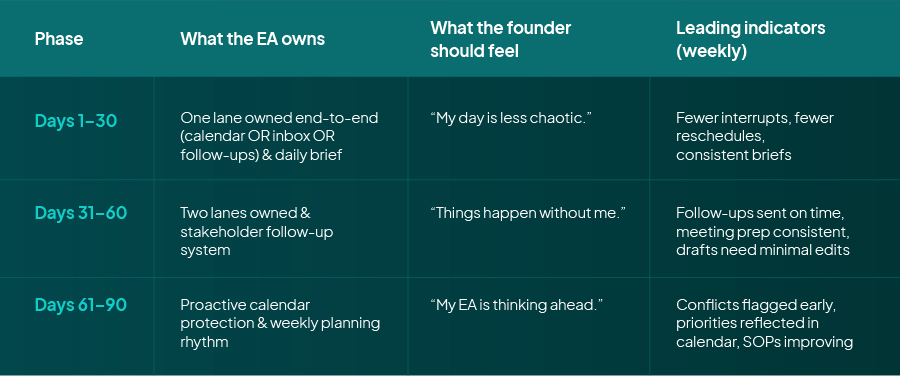
That’s the point of onboarding remote employees: measurable shifts, not “comfort.”
Days 1–30: Build trust through one lane
The fastest way to break remote EA onboarding is to give them ten responsibilities and no ownership. Most mistakes in onboarding remote employees happen here: too much scope, too soon.
Pick one lane:
- Calendar ownership, or
- Inbox triage, or
- Follow-up system
What “lane ownership” means
If you assign calendar ownership, the EA does:
- meeting scheduling and confirmations
- buffer rules
- time zone checks
- agenda requests
- reschedule handling
- calendar hygiene
The founder does not “help,” except for a short daily sync.
This is the most reliable way to handle onboarding remote employees because it creates a clean boundary early.
Days 1–30 deliverables
By the end of 30 days, the EA should deliver:
- A “How I work with the founder” doc (their understanding)
- A stakeholder map (top people, patterns, expectations)
- A saved template set (follow-ups, scheduling, reschedule notes)
- A stable daily brief
- One lane running without reminders
Days 31–60: Expand scope without expanding confusion
This is also where onboarding remote employees either compounds or collapses. Days 31–60 are where the role becomes valuable. This is the phase where many EAs stay stuck if the founder keeps changing rules without documenting them.

Expand to a second lane
If the EA owns a calendar in month one, month two can add:
- inbox triage rules, or
- follow-up workflows, or
- CRM clean-up (if relevant)
Install the escalation rubric (this prevents “quick questions”)
Write these rules once:
Escalate immediately if:
- It affects revenue, legal, or a critical relationship
- It blocks today’s top priority
- It requires a decision only the founder can make
Handle without asking if:
- It’s within the agreed templates/rules
- It’s scheduling within priority windows
- It’s a standard follow-up cadence
Days 61–90: Turn the EA into a proactive system
If onboarding remote employees was done right, this phase runs itself. By Days 61–90, the EA should stop being reactive. The role becomes a “protective layer” around your time.
What proactive looks like:
- flagging calendar conflicts before they hit
- drafting weekly priorities before Monday
- pushing decisions into one place (daily brief)
- updating SOPs when something breaks
If you’re still answering 20 “quick questions” a day at Day 70, the problem is not talent. It’s your system.
SOP templates
SOPs are what separate structured onboarding of remote employees from informal trial and error. These SOPs are the difference between “helpful” and “owner.” They also make training reusable, so your hiring and onboarding get faster with every hire.
SOP 1: Daily Brief (sent before your first meeting)
Subject: Daily Brief
Format:
- Top 3 priorities today
- Meetings that matter (goal & desired outcome)
- Risks/conflicts (time, missing prep, stakeholder delays)
- Decisions needed (yes/no or A/B only)
- Follow-ups sent & what’s pending.
SOP 2: Meeting Prep
For each meeting, include:
- meeting goal in one sentence
- who’s attending + context
- agenda draft (even if short)
- What the founder needs to decide
- follow-up list template
SOP 3: Inbox triage rules
- Tag by urgency (Today / This week / Later)
- Draft responses for common asks
- Move questions into the Questions Log.
- Escalate only if it hits the escalation rubric.
SOP 4: Follow-up system
- Follow-up 1: 24–48 hours
- Follow-up 2: 3–5 business days
- Escalate if there is no response and the stakes are high.
- Log every follow-up action in one tracker.r
SOP 5: Questions Log
Single doc/table with:
- question
- proposed answer
- decision needed (Y/N)
- deadline
Review this in the daily sync, not across Slack all day. This is one of the best onboarding ideas for remote employees because it helps maintain focus on both sides.
Remote onboarding tools and remote onboarding software.
Minimal remote onboarding tools (recommended)
- Slack for communication
- Google Workspace or Microsoft 365
- One task system (Asana/ClickUp/Jira)
- Notion or Drive for SOPs
- Password manager (1Password)
When remote onboarding software is worth it
Use remote onboarding software if:
- You’re on board often (multiple hires per month)
- HR/IT access is a recurring failure point.
- You need visibility across departments
Otherwise, your remote onboarding checklist and SOPs will outperform most tools.
Analytical failure modes (what breaks onboarding remote employees)
Failure mode 1: “Everything is important.”
Fix: weekly priorities and daily brief; otherwise, the EA can’t triage.
Failure mode 2: The founder changes the rules daily
Fix: document rules in SOPs, update weekly, not hourly.
Failure mode 3: No “definition of done.”
Fix: define outcomes per lane (what success looks like).
Failure mode 4: Too much async delay
Fix: overlap hours, Questions Log, and escalation rules.
If you treat onboarding remote employees like a system, these problems become predictable and fixable.
Conclusion
If your calendar is still a mess by Day 30, your EA didn’t “miss something.” Your onboarding did.
Structuring onboarding for remote employees is the only reliable fix. This 30-60-90 plan fixes that by doing one thing quickly: transferring ownership. One lane becomes owned by Day 30, two lanes by Day 60, and by Day 90, your EA isn’t waiting for direction as they’re protecting your priorities, surfacing decisions, and keeping follow-ups moving without chasing.
Anywhere Talent builds this outcome on purpose. We place executive assistants who can run the lane, then we keep the onboarding tight with post-placement check-ins, backed by our Precision Fit Guarantee and 60–90-day replacement support if it’s not the right match.
FAQs
Start before Day 1 with access, a first-week agenda, and one lane for ownership. Use a remote onboarding checklist, daily 10–15 minute check-ins in Week 1, and a 30-60-90 plan so ownership expands in phases.
A remote onboarding checklist should cover preboarding (tools, access, first-week schedule), Day 1 quick wins, Week 1 role clarity, and 30–90 day milestones tied to outcomes. For EAs, include stakeholder map, escalation rules, and SOP templates.
Active onboarding is usually 2–4 weeks, but a real ramp for high-context roles (like a remote EA) takes 60–90 days. The measure is independence, not time served.
Create a realistic first-week plan, give one quick win task, use a Questions Log instead of constant pings, and install a weekly review loop that updates SOPs.
If you onboard occasionally, a checklist and SOPs are enough. If you onboard frequently across teams, remote onboarding software helps standardize tasks and access so steps don’t get missed.
You should see fewer founder interruptions, consistent execution of an owned lane, cleaner daily briefs, and fewer missed follow-ups. By Day 60, the EA should be taking initiative within clear rules.
Run a 30-minute weekly review focused on outcomes: what improved, what broke, what rules need updating. The founder’s job is to remove ambiguity, not to redo tasks.